


By signing in, I agree to the Qadoshop.com Membership Agreement and Privacy Policy, and to receive emails about the platform’s products and services.
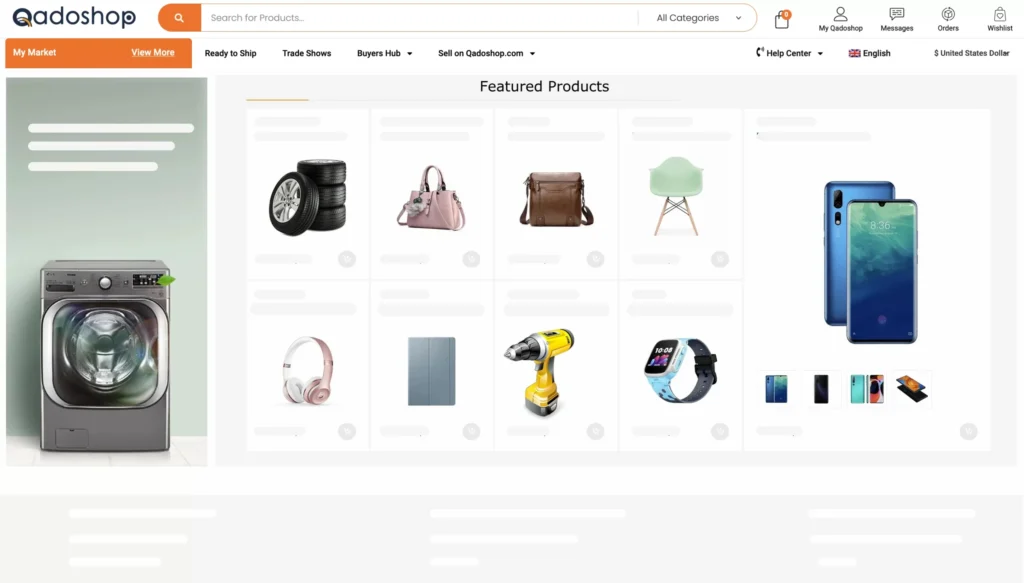
Product Showcase is an effective tool exclusively available to Gold Suppliers, empowering them to elevate their product listings and secure top positions on the search engine result pages of the marketplace.
Apply to try out products posting feature for 10 days. Get started to see what your products exhibition could look like on Qadoshop.com.
Utilizing Featured Product Showcase on Qadoshop.com offers numerous advantages. Key benefits include improved ranking, increased exposure, and enhanced flexibility in managing your listings.
To achieve a higher ranking, feature your best-selling products in the Product Showcase.
Listings featured in the Product Showcase receive greater exposure compared to products that are not boosted using this tool.
Managing and adjusting Featured Product listings is a straightforward process, making it an excellent choice for sellers seeking flexible marketing strategies.
Qualified sellers can effortlessly establish and oversee their Product Showcase directly from the “My Qadoshop Seller/Supplier” dashboards, requiring just a few clicks. The straightforward setup process adds to the overall value of this selling tool, making it highly convenient for sellers.
Open the “Products'' tab. You can find this in the menu on the right hand side of your “My Qadoshop Seller/Supplier” dashboard.
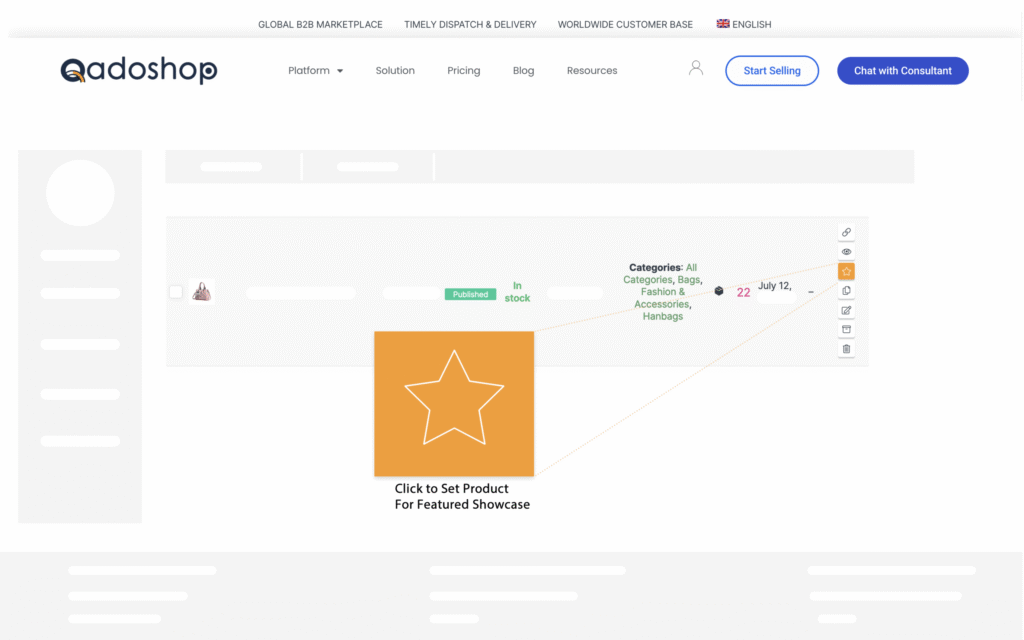
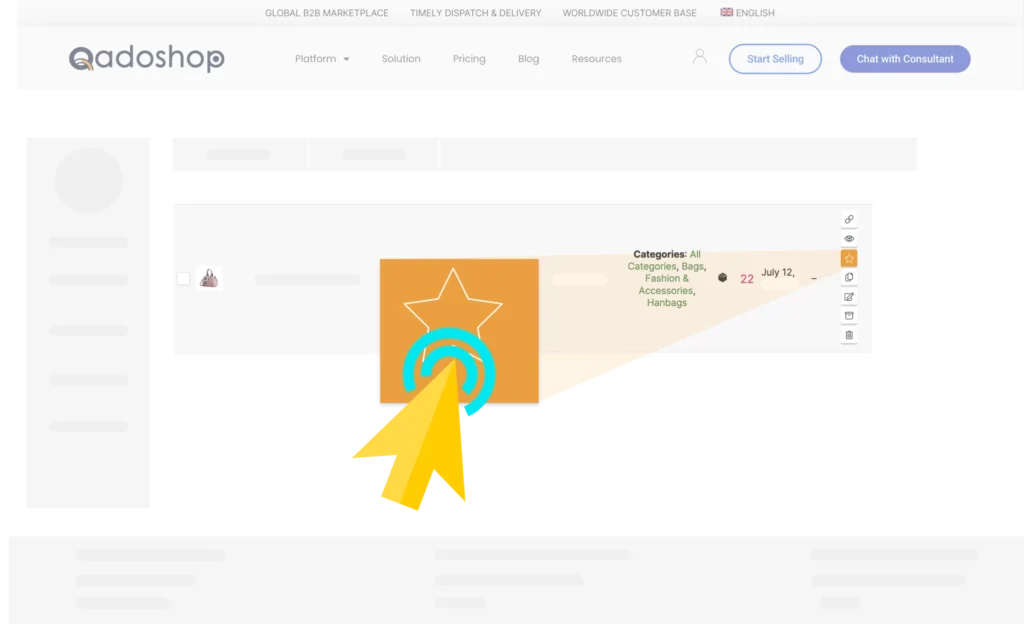
Next, locate the star-like icon at the extreme right corner of the product you want to mark as featured. This can be found under the "Action" section of the “Products” menu.
Finally, click “Mark Featured” and the Product(s) will be automatically added to the "Featured Showcase".
Managing your Featured Product Showcases is quick and easy, and it can also be done in your “My Qadoshop Seller/Supplier” dashboard. It only takes a couple of clicks to replace or remove your current showcases to make room for new ones.
Search and locate the product you want to remove from Featured Products
Simply click the Star-Like icon under the active product “Action” column to remove the product from “Featured Showcase”.
Product Showcase is a valuable tool that can help sellers maximize their sales. By applying a few simple strategies and optimizations, sellers can create more attractive listings that will stand out from the competition.



Introduction
This Privacy Policy provides clear and comprehensive information about the data that Qadoshop collects from you and explains how and why we collect, use, and manage that data.
For the purposes of the General Data Protection Regulation (EU 2016/679), the data controller is Qadoshop (see Contact Details). Qadoshop is based in Côte d’Ivoire and is responsible for data collected through websites and tradeshows managed by Qadoshop. While Qadoshop is primarily responsible for your personal data, it may be held in databases accessible by other affiliated entities of Qadoshop.
We may periodically update this Policy to stay compliant with legal requirements. Please refer to the “Last Updated” date at the bottom of this page to see when this Policy was last revised. We may also notify you of significant changes by email or by displaying an alert when you access our systems. This Policy is not intended to override any contractual terms between us or between buyers and suppliers, nor any rights you have under applicable data protection laws.
Contact Details
The primary contact for all issues related to this Policy, including requests to exercise data subject rights, is our Data Protection Officer. If you have concerns or complaints regarding how we handle your personal information, please contact us, and we will aim to resolve the issue promptly.
* Email: dpo@qadoshop.com
* Alternatively, contact our Customer Services Department:
Email: service@qadoshop.com
Phone: (225) 0704029075
You also have the right to lodge a complaint with the relevant data protection authority for your country or region.
Global Privacy Enforcement Network Members
We are represented in the EU and can be contacted through service@qadoshop.com.
Third-Party Links
Our website may contain links to and from websites of our partner networks, advertisers, and affiliates. These websites have their own privacy policies, and we do not accept any responsibility for them. Please review their privacy policies before submitting personal data.
How Do We Collect Your Personal Data?
We collect your data through various means:
a) At Trade Shows, Roadshows, Seminars, and Conferences:
i) Registration forms
ii) Check-in updates
iii) Scanned business cards
iv) Booth visit history (scanned by exhibitors)
b) Through Website Forms:
i) Registration & inquiry forms
ii) Subscription forms (e.g., Notifications, Product/Supplier Alerts, eMagazines)
iii) Direct order forms
iv) MATCH service application details
c) Call Center Activities:
i) Telemarketing: Market surveys and prospect qualification.
ii) Customer Service: Users contact us via chat, hotline, email, or fax.
d) Systems Tracking Functions:
We use Cookies and related technologies to capture activity on our websites. The provisions in our Cookie Policy apply to this data.
e) Other Sources:
Public databases, marketing partners, and third-party software applications/social media platforms.
What Personal Data Do We Collect?
The personal information we collect includes:
Contact & Communication Details: Name, addresses, phone numbers, email, social media contact details.
Business Details: Job title, company name, company demographics.
Preferences: Marketing preferences, subscriptions, display and language settings.
Communications: Calls/messaging between customer service or sales team members and visitors, advertisers, or prospects.
Buying & Payment History: Sample requests, orders, subscriptions, event bookings.
Device & Log Information: IP address, browser type, device identifiers, and website/app activity.
Online Behavioral Data: Cookies and tracking data, such as session frequency, search terms, and profile views.
Offline Behavioral Data: Trade shows attended, exhibitors visited, summits/events attended.
What Do We Use Your Personal Data For?
We use your data to provide you with our products and services, develop new offerings, and protect Qadoshop and its visitors, exhibitors, buyers, suppliers, and advertisers as follows. In some instances, we may request data directly from you. If you do not provide the requested data or restrict our ability to collect it, we may not be able to offer the products or services you require.
We use your data for legitimate business interests, including:
a) Personalized product recommendations: We create personalized recommendations on behalf of online advertisers to share with visitors via email or phone.
b) Marketing of Qadoshop services: We market relevant services such as Product/Supplier Alerts or eMagazines via direct mail, eDMs, telemarketing, SMS, or through third-party platforms including Facebook and LinkedIn.
c) Marketing of Qadoshop Tradeshows and services: We market tradeshows, buyer apps, and events via similar platforms and methods as described above.
d) Third-party marketing lists: We create lists of visitors who opt in to third-party marketing, segmented by preferences or demographics, and share them with verified third-party vendors.
e) Surveys and research: We use contact lists to conduct surveys and similar market research activities.
f) Facilitating communication: We review visitor details for qualification purposes by advertisers and exhibitors, using our messaging services to facilitate communication between parties.
g) Customer service: Our team uses your personal data to respond to comments, feedback, and inquiries.
h) Technical support: We use your data to audit, analyze, research, and enhance our products and services, detect fraud, and protect your rights and our property.
h) Legal and regulatory obligations: We use data as needed to comply with legal and regulatory obligations.
We will only use your personal data for the purposes outlined above when necessary and under the following legal grounds:
i) To comply with legal or regulatory obligations
ii) To fulfill contractual obligations between you and us
iii) To support our legitimate business interests while respecting your privacy
iv) With your explicit consent in limited, clearly defined cases
How Do We Secure Your Personal Data?
While we cannot guarantee 100% security, we are committed to protecting your personal data from unauthorized access or alteration. Measures include:
a) Regular reviews of our data collection, storage, and processing practices, including engaging external security consultants.
b) Restricting access to personal data to employees and contractors subject to confidentiality agreements.
c) Implementing strong access controls such as two-factor authentication, encryption, and pseudonymization.
We encourage you to protect your account with a strong, unique password, enable two-factor authentication, and keep your computer up to date with security patches and anti-malware software.
Please note that you are responsible for any personal data you voluntarily share or submit on our website, which may be visible to others through third-party applications or messaging services.
How Long Do We Keep Your Personal Data?
We will retain your personal data for as long as reasonably necessary for the purposes listed in this policy. When no longer required, your data will be securely deleted or anonymized.
In some cases, we may retain your data for longer, such as for legal, regulatory, or accounting reasons, or if we believe legal action may arise from your personal data or dealings. Typically, data retention does not exceed 7 years from the last engagement.
Who Do We Share Your Personal Data With?
We may share your personal data with third parties to manage our business and deliver services, including:
a) Service providers: Companies that manage IT, fulfill orders, deliver packages, send emails, analyze data, and provide marketing or customer services.
b) Regulatory authorities: Data protection and law enforcement agencies in Hong Kong, the EU, and globally.
c) Other third parties: For detecting fraud, preventing security issues, and protecting the rights and safety of our users.
d) Business reorganizations: We may transfer data during mergers, sales, joint ventures, or similar business transactions.
Direct Marketing
We may use your personal information to send marketing communications about our products and services, including emails, SMS, phone calls, or targeted online advertisements. Marketing communications will be based on your preferences and may include product announcements or event information. You can opt-out at any time by following the instructions in such communications.
Profiling
We use information we collect about your activity to personalize the content, offers, and ads displayed to you. This process, known as profiling, involves segmenting visitors using algorithms to generate personalized recommendations. If you wish to opt-out of receiving personalized content, please contact the Customer Services Team or DPO.
Transfers of Personal Data to Non-EU Countries or International Organizations
Your data may be transferred to and stored outside the European Economic Area (EEA), and processed by staff or service providers located outside the EEA. We ensure your data is treated securely and transferred to countries that either:
a) Provide an adequate level of protection, as recognized by the EU (e.g., under the EU-U.S. Privacy Shield).
b) Are subject to appropriate contractual commitments that protect your data.
For more information on the safeguards in place, please contact our customer care service of mail DPO.
What Rights Do You Have?
You have several rights regarding your personal information, including:
a) Access: Request a copy of your data and other information related to its use.
b) Rectification: Request correction of inaccurate personal data.
c) Erasure (Right to be Forgotten): Request deletion of your data under specific conditions.
d) Restriction: Request limited processing of your data in certain circumstances.
e) Objection: Object to the processing of your data based on legitimate interests or for direct marketing purposes.
f) Data Portability: Request your data in a structured format or ask for it to be transferred to another data controller.
To exercise any of your rights, please contact us. We may require proof of identity for security reasons and will not charge fees unless the request is unfounded, repetitive, or excessive.
We aim to respond to requests within one month, but more complex requests may take up to three months. If this is the case, we will notify you of the delay.
You also have the right to lodge a complaint with your local data protection authority.
1. Introduction and Acceptance of Terms
This Website (the “Site”) is an electronic publication and service provided by Qadoshop Limited (hereinafter referred to as “Qadoshop”, “we”, “us”, or “our”).
1.2 By accessing or using this Site, you acknowledge that you have read, understood, and agree to be bound by these Terms of Use (“Terms”), as well as any additional guidelines, notices, operating rules, policies, and instructions that may be published on the Site from time to time.
1.3 If you do not agree to these Terms, please do not access or use this Site. Your continued use of the Site following the posting of any changes to these Terms constitutes your acceptance of those changes.
2. Modifications to Terms
2.1 Qadoshop reserves the right, at our sole discretion, to modify, add, or remove portions of these Terms at any time without prior notice.
2.2 It is your responsibility to check these Terms periodically for changes. The most current version of the Terms will be posted on the Site with the “Last Updated” date.
2.3 Your continued use of the Site following the posting of any changes to these Terms constitutes your acceptance of those changes.
3. Intellectual Property Rights
3.1 Copyright: All content on this Site, including but not limited to text, graphics, logos, button icons, images, audio clips, digital downloads, data compilations, and software, is the property of Qadoshop or its content suppliers and is protected by international copyright laws.
3.2 Trademarks: All trademarks, service marks, and trade names used on the Site are proprietary to Qadoshop or other respective owners. You may not use, copy, reproduce, republish, upload, post, transmit, distribute, or modify these trademarks in any way without our prior written consent.
3.3 License and Site Access: Qadoshop grants you a limited, revocable, and nonexclusive license to access and make personal use of the Site. This license does not include any resale or commercial use of the Site or its contents.
4. Use of Website Content
4.1 Permitted Use: You may view, download, and print content from this Site for your personal, non-commercial use only, provided that: a) You retain all copyright and other proprietary notices contained in the original content; b) You do not modify the content; c) You do not use the content in a manner that suggests an association with any of our products, services, or brands.
4.2 Prohibited Use: You must not, without our express written permission:
a) Use the content for any commercial purpose, or for any public display;
b) Remove any copyright or other proprietary notices from the content;
c) Transfer the content to another person or “mirror” the content on any other server;
d) Modify, copy, distribute, transmit, display, perform, reproduce, publish, license, create derivative works from, transfer, or sell any information, software, products, or services obtained from this Site.
5. User Accounts
5.1 Account Creation: Some areas of the Site may require you to create an account. You agree to provide accurate, current, and complete information during the registration process and to update such information to keep it accurate, current, and complete.
5.2 Account Security: You are responsible for maintaining the confidentiality of your account and password and for restricting access to your computer. You agree to accept responsibility for all activities that occur under your account or password.
5.3 Account Termination: We reserve the right to refuse service, terminate accounts, remove or edit content, or cancel orders at our sole discretion.
6. User Conduct
6.1 Lawful Use: You agree to use this Site only for lawful purposes and in a manner that does not infringe the rights of, or restrict or inhibit the use and enjoyment of this Site by, any third party.
6.2 Prohibited Conduct: Without limiting the generality of the foregoing, you agree not to: a) Use the Site in any manner that could damage, disable, overburden, or impair the Site or interfere with any other party’s use of the Site; b) Attempt to gain unauthorized access to any portion or feature of the Site, or any other systems or networks connected to the Site; c) Harvest or collect email addresses or other contact information of other users from the Site by electronic or other means; d) Use the Site to transmit any unlawful, harassing, libelous, defamatory, abusive, threatening, harmful, vulgar, obscene, or otherwise objectionable material; e) Transmit any material that contains software viruses or any other computer code, files, or programs designed to interrupt, destroy, or limit the functionality of any computer software or hardware or telecommunications equipment.
7. Product Information and Availability
7.1 Product Descriptions: We strive to provide accurate product descriptions, but we do not warrant that product descriptions or other content on this Site are accurate, complete, reliable, current, or error-free.
7.2 Pricing: While we make every effort to display accurate pricing information, we reserve the right to correct any pricing errors and to change prices without notice.
7.3 Availability: The availability of products and services on the Site may change without notice. We reserve the right to limit quantities of any products or services that we offer.
8. Disclaimer of Warranties
8.1 This Site is provided on an “as is” and “as available” basis. Qadoshop makes no representations or warranties of any kind, express or implied, as to the operation of this Site or the information, content, materials, or products included on this Site.
8.2 To the full extent permissible by applicable law, Qadoshop disclaims all warranties, express or implied, including, but not limited to, implied warranties of merchantability and fitness for a particular purpose.
8.3 Qadoshop does not warrant that this Site, its servers, or email sent from Qadoshop are free of viruses or other harmful components.
9. Limitation of Liability
9.1 Qadoshop will not be liable for any damages of any kind arising from the use of this Site, including, but not limited to direct, indirect, incidental, punitive, and consequential damages.
9.2 Certain state laws do not allow limitations on implied warranties or the exclusion or limitation of certain damages. If these laws apply to you, some or all of the above disclaimers, exclusions, or limitations may not apply to you, and you might have additional rights.
10. Indemnification
You agree to indemnify, defend, and hold harmless Qadoshop, its officers, directors, employees, agents, licensors and suppliers from and against all losses, expenses, damages and costs, including reasonable attorneys’ fees, resulting from any violation of these Terms of Use or any activity related to your account (including negligent or wrongful conduct) by you or any other person accessing the Site using your account.
11. Third-Party Links
11.1 This Site may contain links to other websites (“Linked Sites”). The Linked Sites are not under the control of Qadoshop, and Qadoshop is not responsible for the contents of any Linked Site, including without limitation any link contained in a Linked Site, or any changes or updates to a Linked Site.
11.2 Qadoshop is providing these links to you only as a convenience, and the inclusion of any link does not imply endorsement by Qadoshop of the site or any association with its operators.
12. User-Generated Content
12.1 User Responsibility: You are solely responsible for any content you post, upload, or otherwise make available on the Site (“User Content”). You represent and warrant that you have all necessary rights to post such content and that it does not violate any applicable laws or infringe any third-party rights.
12.2 License Grant: By posting User Content on the Site, you grant Qadoshop a non-exclusive, royalty-free, perpetual, irrevocable, and fully sublicensable right to use, reproduce, modify, adapt, publish, translate, create derivative works from, distribute, and display such content throughout the world in any media.
12.3 Content Removal: Qadoshop reserves the right to remove any User Content from the Site at any time, for any reason, without notice.
13. Termination
13.1 Qadoshop reserves the right, in its sole discretion, to terminate your access to all or part of this Site, with or without notice, for any reason, including without limitation breach of these Terms of Use.
13.2 Upon termination, all provisions of these Terms which by their nature should survive termination shall survive, including, without limitation, ownership provisions, warranty disclaimers, indemnity, and limitations of liability.
14. Governing Law and Jurisdiction
14.1 These Terms of Use shall be governed by and construed in accordance with the laws of [insert applicable jurisdiction], without giving effect to any principles of conflicts of law.
14.2 Any legal action or proceeding relating to your access to or use of the Site or these Terms of Use shall be instituted in [insert applicable court and jurisdiction]. You and Qadoshop agree to submit to the jurisdiction of, and agree that venue is proper in, these courts in any such legal action or proceeding.
15. Severability
If any provision of these Terms is found to be unlawful, void, or for any reason unenforceable, then that provision shall be deemed severable from these Terms and shall not affect the validity and enforceability of any remaining provisions.
16. Entire Agreement
These Terms of Use, together with our Privacy Policy and any other legal notices published by us on the Site, shall constitute the entire agreement between you and Qadoshop concerning the Site.


Expand your market reach beyond borders, connecting with potential buyers on a global scale and maximising opportunities for growth.
How was your call?

Qado Care Support
Tell us who you are so we can personalise your experience.
How was your experience?
Request a callback instead
How was your call?
Login required
Please log in to submit a support ticket so we can link it to your account and keep you updated.
Log in to continueCan't find what you're looking for?